One command to make AI auto-generate your weekly review
Related code: 5.todo/weeks/tools/update-growth.py (the growth-profile auto-update script; full source in the “Let the profile grow itself” section below)
Related video: 008 - Project management
cover: Is your AI weekly review all “correct nonsense”? | “Obsidian + AI: finish your weekly review in one click”
title: One command to make AI auto-generate a weekly review that’s “true only for you”
Description
You’ve probably tried doing a weekly review with AI: first recall, then organize into a list, then hand it to the AI to summarize — only to realize, “if I’ve already organized it this neatly, I could summarize it myself; what do I need the AI for?”
The problem is the division of labor is backwards: you carry the most exhausting part — “recall + organize” — yourself, and only give the easiest part, “summarize,” to the AI.
This episode flips the whole process around: attach a git that auto-commits hourly to your Obsidian vault, so your notes, todos, and git log form a chain of evidence; then write your “long-term goals + personality traits + last week’s review” into the prompt, so the review is “true for you alone.” Finally collapse it all into one /周复盘 command — the AI automatically reads through all your records for the week and generates a review based on your real behavioral trail.
An auto-review system you set up once and use for years: you take notes normally, the system quietly keeps evidence in the background, and once a week one line — /周复盘 — has the AI read through all your records for the week and generate a review that’s genuinely based on your behavioral trail and true for you alone.
The whole time, you don’t list anything, don’t recall anything, don’t feed it material.
1. First, get clear: why your AI reviews are always useless
You’ve probably tried doing a weekly review with AI, but the process usually goes like this:
First recall — what did I do Monday, what did I do Tuesday…
Then organize it into a list
Finally hand the list to the AI to summarize
Halfway through the list you hit an awkward truth:
The illusion
Since I’ve already organized it this far, I could summarize it myself — what do I even need the AI for?
The problem is the division of labor is backwards: you carry the two most exhausting things, “recall” and “organize,” yourself, and only toss the easiest part, “summarize,” to the AI.
This tutorial flips the process entirely around — let the AI read through all your records for the week itself and generate the review automatically. You list nothing.
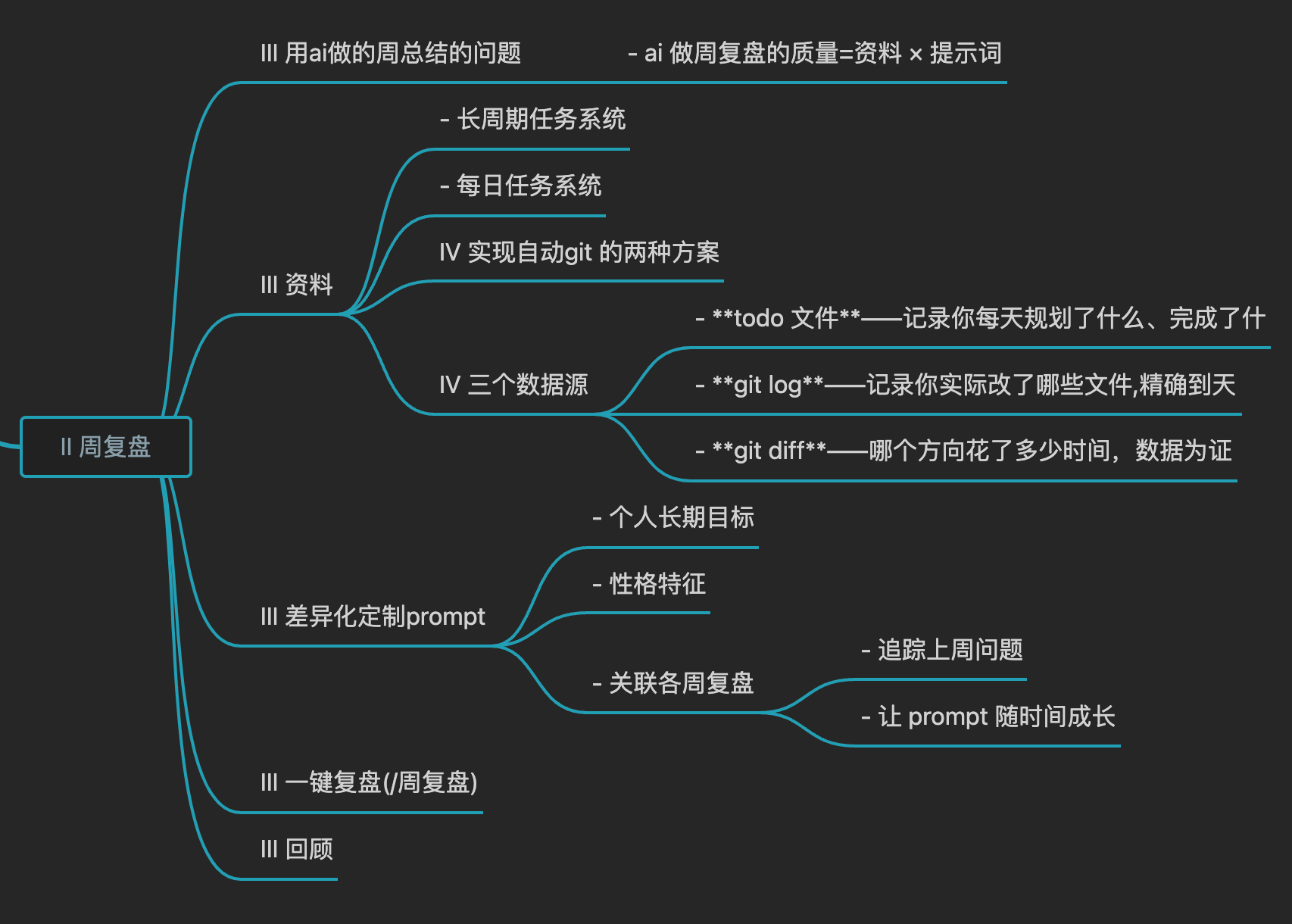
Remember this core formula; every step below revolves around it:
Core formula
Review quality = material × prompt
Material determines whether the AI “knows what you did”
The prompt determines whether the AI “can say what actually lands for you”
Let’s tackle each part below.
2. Material: let the AI read it, instead of you feeding it
There’s just one core question: how do you get the AI the most complete data for the week, with zero effort on your part?
The base data source is Obsidian — use it to track long-term projects and daily tasks (see the previous episode, 008 - Project management). On top of that, you only need one more step:
Record how your notes change over time
Attach a git to your Obsidian vault and have it auto-commit every hour.
Put simply, treat your notes folder like a code repo, and let it automatically record “what you changed each time, and which files” in the background.
Step 1: initialize git
In the vault root, run:
git init
Step 2: attach a scheduled auto-commit script
Goal: check once an hour whether any files changed; if so, auto-commit, with the commit message automatically including the date and file count. It runs quietly in the background, unnoticed.
Here are two approaches; pick based on your scenario:
Option 1: launchd (recommended for Mac laptop users)
Best for: an iCloud vault + a laptop that gets closed at random during the day. cron easily misses runs, while launchd catches up after waking, which is more reliable.
① Create the plist file~/Library/LaunchAgents/com.jz.auto-git-all-in.plist:
If the repo is in an iCloud directory, the /bin/bash process launchd starts doesn’t have “Full Disk Access,” can’t read the iCloud folder, and git will fail.
Fix: open System Settings → Privacy & Security → Full Disk Access, click +, press Cmd+Shift+G, type /bin/bash, add it and turn on the toggle.
Note: granting /bin/bash full-disk access is fairly broad in scope; on a shared computer it’s best to narrow the scope.
Option 2: a long-running script (desktop / server, always on)
For an always-on machine, this is simpler. Save the following as /Users/jz/auto-git-all-in.sh:
Once this is done, you have three data sources that form a complete chain of evidence:
Data source
What it proves
todo files
what you planned to do and finished each day
git log
which files you actually touched, down to the day
git diff —stat
how much change went into which direction, with data to prove it
Where a review should really dig
todo is what you “think” you did; git is what you “actually” did. The gap between them is exactly where a review should dig deepest.
And the AI reads all of this itself — you feed it not a single word.
This part is done
Set it up once and never touch it again. From today on, every record you make is being quietly preserved as evidence.
3. The prompt: make the review “true for you alone”
The biggest flaw of a review built from a generic prompt is: it says the same thing to everyone.
It all sounds right, but it’s all “correct nonsense” — because it doesn’t actually know you.
A genuinely useful review must be built on “understanding this person.” So you write three kinds of information into the prompt:
① Personal long-term goals
Give the AI a main axis, and it can judge: are the things you did this week moving toward your goal, or spinning in place?
Example: freedom (money / time / location / relationships) × growth × personal IP × system-building × compounding.
② Personality traits
Write the prompt to fit your personality, and the review can hit your sore spots. Don’t know how to describe yourself? Use MBTI or your long-stable behavioral habits as an anchor.
This way the AI no longer talks in generalities, but can pinpoint: where you’re really stuck.
③ Let the prompt grow over time
Each time a review ends, append one line to the prompt:
本次新发现的模式:____

每月检查一次盲区清单:删掉已经真正改变的,加入新识别的。
A living document
In the end, your prompt is no longer a fixed piece of text but a living document — it records not just your goals, but the evolution of you as a person. The longer you use it, the better it knows you.
Let the profile grow itself: update-growth.py
Manually appending to the profile is too easy to forget, so hand this step to a script: when the review is generated, the AI leaves a ---UPDATE--- block at the end of the week file (writing this week’s “pattern” and “newly identified blind spots”), and the script reads it and automatically moves the content into the growth profile — both the “pattern log” and the “blind-spot list” stay newest-at-top.
When does it run?
You don’t run it manually. The last step of the /周复盘 command (see “4. Collapsing it” step 6 below) calls it automatically, so the profile updates right after the review is saved.
The update-growth.py script (swap the path for your own vault):
#!/usr/bin/env python3"""从最新一份周复盘文件提取 ---UPDATE--- 块,追加到成长档案。用法:python3 update-growth.py [可选:指定周文件路径]"""import reimport sysfrom pathlib import Pathfrom datetime import dateVAULT = Path("/Users/jz/Library/Mobile Documents/iCloud~md~obsidian/Documents/all-in")WEEKS_DIR = VAULT / "5.todo/weeks"GROWTH_FILE = VAULT / "5.todo/prompt/周复盘prompt-成长.md"PATTERN_HEADER = "## 模式日志"BLIND_HEADER = "## 我的盲区清单"def find_latest_week_file(): files = sorted(f for f in WEEKS_DIR.glob("*.md") if f.name != "tools") if not files: sys.exit("错误:5.todo/weeks/ 中没有找到 .md 文件") return files[-1]def extract_update_block(content): m = re.search(r"---UPDATE---\n(.*?)\n---END UPDATE---", content, re.DOTALL) if not m: return None data = {} for line in m.group(1).strip().splitlines(): if ": " in line: key, val = line.split(": ", 1) data[key.strip()] = val.strip() return datadef insert_after_header(content, header, entry): """在指定 ## 标题行之后、下一个 ## 标题之前插入 entry。""" header_pos = content.find(f"\n{header}") if header_pos == -1: return content, False line_end = content.find("\n", header_pos + 1) if line_end == -1: return content + entry, True return content[: line_end + 1] + entry + content[line_end + 1 :], Truedef main(): if len(sys.argv) > 1: week_file = Path(sys.argv[1]) else: week_file = find_latest_week_file() print(f"读取:{week_file.name}") content = week_file.read_text(encoding="utf-8") data = extract_update_block(content) if not data: print("未找到 ---UPDATE--- 块,跳过。确认复盘文件末尾有该块。") return week = data.get("周", "?") pattern = data.get("模式", "?") new_blind = data.get("盲区新增", "无") growth = GROWTH_FILE.read_text(encoding="utf-8") # 追加模式日志(最新在顶部) log_entry = f"\n### {week} ({date.today()})\n{pattern}\n" growth, ok = insert_after_header(growth, PATTERN_HEADER, log_entry) print(f"✓ 模式日志已追加:{week}" if ok else f"✗ 未找到 `{PATTERN_HEADER}` 节") # 追加新盲区(最新在顶部) if new_blind and new_blind != "无": blind_entry = f"\n- {new_blind}\n" growth, ok = insert_after_header(growth, BLIND_HEADER, blind_entry) print(f"✓ 盲区已新增:{new_blind}" if ok else f"✗ 未找到 `{BLIND_HEADER}` 节") GROWTH_FILE.write_text(growth, encoding="utf-8") print("✓ 成长档案已更新")if __name__ == "__main__": main()
Key point
The script itself doesn’t “think” — it only moves the conclusions the AI wrote in the ---UPDATE--- block. So the “pattern / blind spots” written into the profile are generated by the AI during the review, and the script just lands them — a clean division of labor that won’t mess up your profile.
Going further: carry over last week’s review
There’s one more setting that’s easy to overlook but very useful — chaining your weekly reviews together. Have the AI read last week’s review before doing this week’s, and ask:
The most important issue flagged last week — was it actually resolved, or did you avoid it?
This week, did the same issue resurface?
Why this step is worth it
Looking at one week, you only see events; chained across a dozen weeks, the AI can see patterns. And patterns are what a review is really about.
Example prompt
This is the prompt I’m currently using — a starting point; tweak it to fit you and it’ll work even better.
 Why Z
Why Z