 Why Z
Why ZObsidian tip: how to make today’s note automatically inherit yesterday’s unfinished tasks.
Code link: daily
00:00 Task management in the daily note 00:12 Auto-carrying tasks over 01:03 Demo
Future improvements
Add a scheduled module to the daily template to show recurring tasks
const date = dv.date(dv.current().file.name);
if (date) {
  const scheduledTasks = dv.pages().file.tasks
    .where(t => !t.completed && t.scheduled && t.scheduled <= date)
    .sort(t => t.scheduled, 'asc');

  const todayTasks = scheduledTasks.where(t => t.scheduled.equals(date));
  const carriedTasks = scheduledTasks.where(t => t.scheduled < date);

  if (todayTasks.length > 0) {
    dv.taskList(todayTasks, false);
  }

  if (carriedTasks.length > 0) {
    dv.taskList(carriedTasks, false);
  }

  if (todayTasks.length === 0 && carriedTasks.length === 0) {
    dv.paragraph("(无 scheduled 任务)");
  }
}
Q&A
Why not use Rollover Daily Todos to inherit yesterday’s tasks?
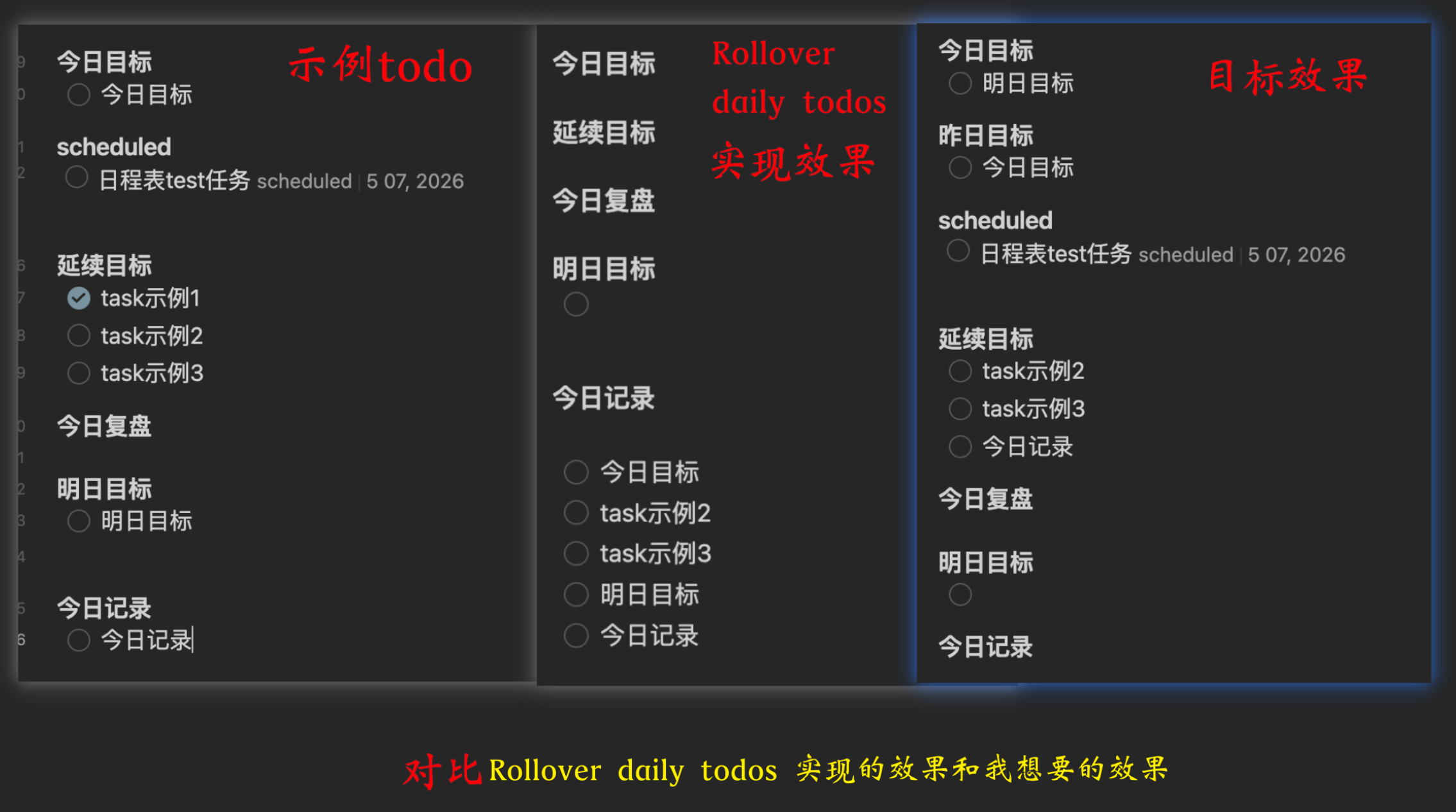
Someone in the comments asked why I don’t just use Rollover Daily Todos to carry over yesterday’s tasks. I wanted to reply directly, but my Bilibili comments don’t allow images, so I figured I’d make a dedicated post to answer.
- When I built this, I was just focused on getting the feature working — I didn’t go search for whether a plugin already did something similar.
- I installed Rollover Daily Todos and tried it. The issues it currently has:
- all tasks are lumped together in one place
- it can’t display the recurring tasks in the
scheduledmodule
Example
Core features
- Auto-backtrack: automatically reads content from the most recent dated note, so it doesn’t matter if you skipped a few days
- Today’s goals: yesterday’s “tomorrow’s goals” automatically become today’s starting point
- Past goals: aggregates past “today’s goals” and “past goals” across dates, so important things aren’t forgotten
- Carry-over records: the unfinished parts of today’s records and carried tasks are automatically brought into the new day
- Auto-dedup: smart cross-block deduplication, so the same item never shows up twice
- Scheduled board: uses Dataview to show all due or overdue planned tasks
- Source tagging: if the data comes from two days ago, it’s automatically tagged “from XX (N days ago)”