 Why Z
Why ZSteps
1. Directory structure
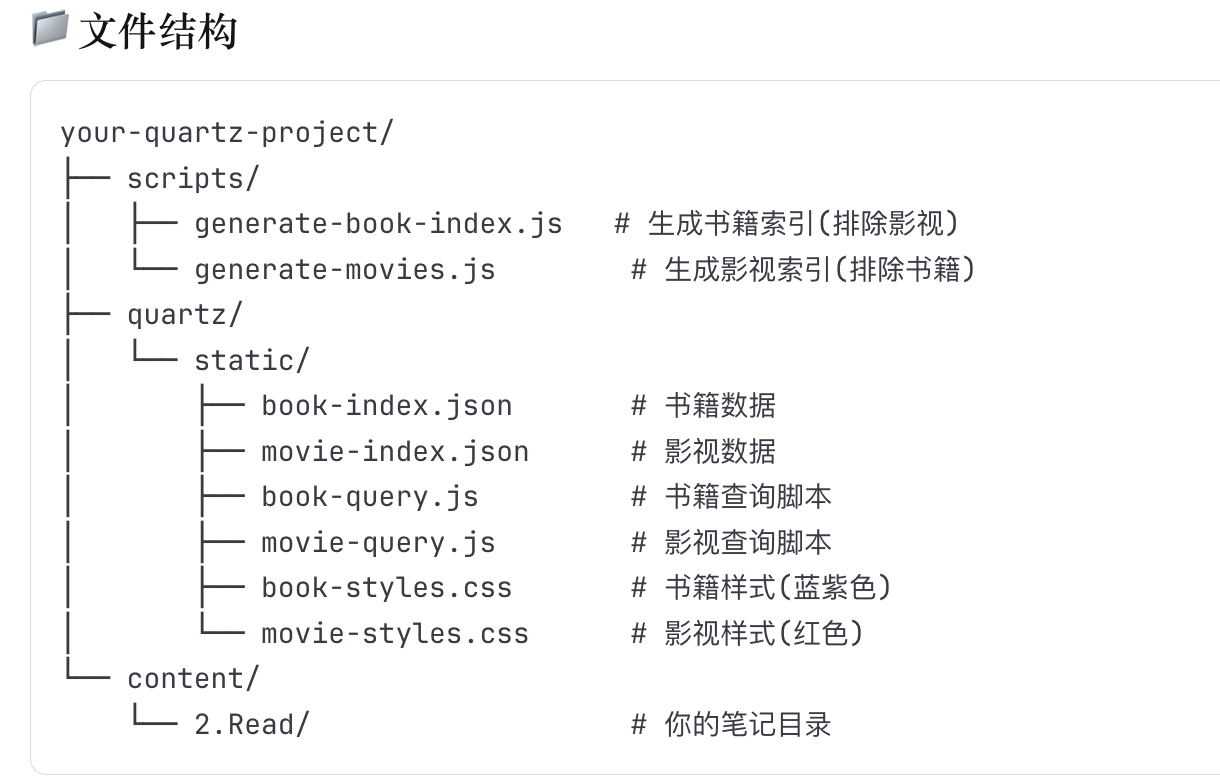
2. Create the files
book
- quartz/static/book-query.js`
- quartz/static/book-styles.css`
- scripts/generate-book-index.js movie
- quartz/static/movie-query.js`
- quartz/static/movie-styles.css`
- scripts/generate-movies.js
3. Include the resources
Make sure quartz.config.ts includes Static
export default {
  configuration: {
    // ...other config
  },
  plugins: {
    // ...other plugins
    emitters: [
      Plugin.ContentPage(),
      Plugin.Static(), // make sure this is here
      // ...other plugins
    ],
  },
}
`
4. Include the CSS and query.js in Head.tsx
{/* Add the book/movie cards at the end of head */}

<link rel="stylesheet" href="/static/book-styles.css" />

<link rel="stylesheet" href="/static/movie-styles.css" />

<script src="/static/book-query.js" defer></script>

<script src="/static/movie-query.js" defer></script>
</head>

return Head

}) satisfies QuartzComponentConstructor
5. Add scripts to package.json
{
  "scripts": {
"prebuild": "npm run generate-all",

"preserve": "npm run generate-all",

"generate-books": "node scripts/generate-book-index.js",

"generate-movies": "node scripts/generate-movies.js",

"generate-all": "npm run generate-books && npm run generate-movies",

"build": "npx quartz build",

"serve": "npx quartz build --serve"
  }
}
6. Push and sync Obsidian with Quartz
Card display
Create a new document in Obsidian for the cards and add the following:
## Currently Watching
<!-- shows movies currently being watched -->
<div data-movie-query data-status="正在观看" data-sort="添加时间" data-order="DESC"></div>

## To Watch
<!-- shows movies on the watch list -->
<div data-movie-query data-status="待看" data-sort="添加时间" data-order="DES"></div>


## Watched
<!-- shows movies already watched -->
<div data-movie-query data-status="想看"></div>